AI chatbot vs AI agent is one of the most common points of confusion in artificial intelligence right now. Both can talk with you in natural language. Both may use large language models. Both can show up inside the same product interface. The difference is what happens after the conversation starts.
A chatbot mainly responds. An agent can be designed to reason, plan, use tools, and take action toward a goal. This beginner-friendly guide explains the difference in plain English, where the line gets blurry, and how to decide which one you actually need.
Quick Answer: What Is the Difference Between an AI Chatbot and an AI Agent?
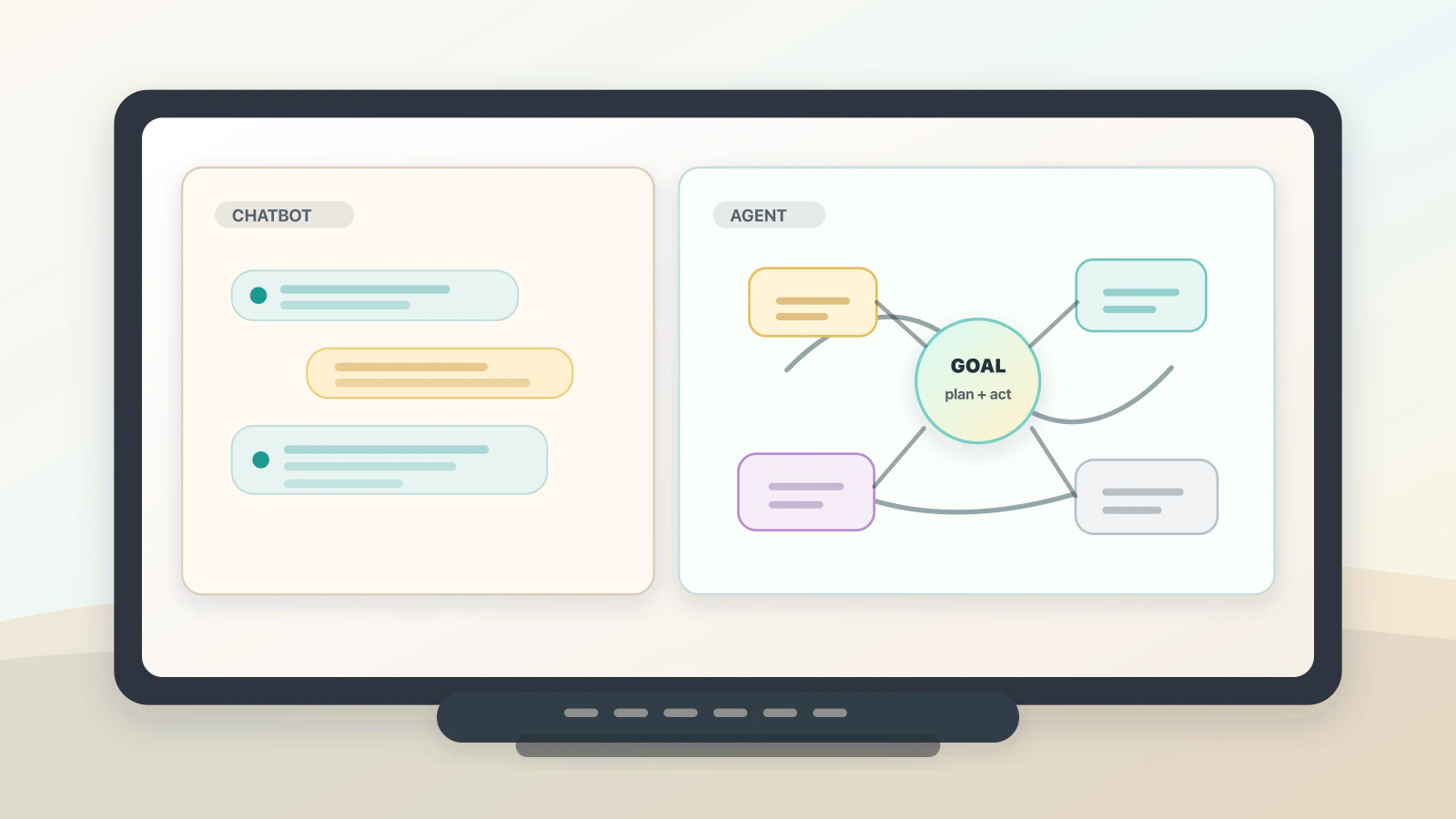
An AI chatbot is mainly a conversational interface: it responds to messages, answers questions, and helps with information or simple tasks. An AI agent is more goal-oriented: it can reason about a request, plan steps, use tools, observe results, and take action across systems with some level of autonomy and human oversight.
AI chatbots and AI agents explained in simple terms
Think of an AI chatbot as a helpful conversation partner. You ask a question, give an instruction, or choose from a flow, and the chatbot replies. It might explain a topic, answer a support question, draft a message, summarise a file, or guide you through a form. The centre of gravity is the chat.
An AI agent is closer to a digital operator with a job to complete. You give it a goal, and it works out some of the steps needed to reach that goal. It may search a knowledge base, call an API, check a calendar, update a ticket, run code, compare results, or ask for approval before doing something risky.
That does not mean agents are magic workers. They still need instructions, tools, permissions, data access, guardrails, and review. A badly designed agent can make confident mistakes faster than a chatbot because it can move beyond talking into doing.
The useful distinction is this:
- A chatbot helps you have a conversation.
- An agent helps you complete a task.
Some tools are both. A customer service assistant might behave like a chatbot while answering a return policy question, then behave like an agent when it checks an order, confirms eligibility, creates a return label, and updates a customer record.
How AI chatbots and AI agents work
Different products use different architectures, but the practical workflow usually looks like this:
- User input: A person asks a question, gives an instruction, uploads a file, or describes a goal.
- Understanding: The system interprets the request, identifies intent, and decides what information or action may be needed.
- Response generation: A chatbot can answer directly from its model, scripts, retrieval system, or connected knowledge base.
- Planning: An agent can break a goal into steps, choose an order of operations, and decide when it needs more information.
- Tool use: An agent can call tools such as search, databases, calendars, code runners, ticketing systems, email, CRMs, or payment systems.
- Observation: After each action, an agent can inspect the result and adjust the next step.
- Oversight: A well-designed system sets limits, logs actions, asks for approval where needed, and hands off to a human when confidence or permission is insufficient.
The important pattern for agents is reason, act, observe. The system reasons about what to do, acts through a tool or interface, then observes what happened before continuing.
AI chatbot vs AI agent: the practical difference
The cleanest beginner distinction is not the interface. Many agents still appear as chat windows. The difference is capability and autonomy.
| Feature | AI chatbot | AI agent |
|---|---|---|
| Main purpose | Hold a conversation and respond to prompts | Pursue a goal and complete tasks |
| Typical behaviour | Reactive, waits for user input | Goal-oriented, can plan next steps |
| Common output | Answer, summary, draft, recommendation, guided response | Completed action, updated record, workflow result, report, code change |
| Tool use | Optional, often limited to retrieval or simple integrations | Central to the design, often uses multiple tools |
| Autonomy | Low to moderate | Moderate to high, depending on permissions |
| Best for | FAQs, explanations, simple support, drafting, search-like help | Multi-step workflows, operations, coding, research, support resolution |
| Main risk | Wrong or misleading answer | Wrong action, data exposure, cost, security, or workflow error |
| Human role | Ask, check, refine | Set goals, define permissions, approve important actions, review outcomes |
A chatbot can be powerful without being agentic. A modern AI chatbot may understand natural language, use retrieval, remember context, and produce sophisticated answers. It becomes more agent-like when it can decide what tools to use, sequence actions, and continue working toward a goal instead of only replying to the next message.
Key parts of an AI agent
Agents are built from familiar software pieces, but the combination matters.
| Part | What it means | Why it matters |
|---|---|---|
| Goal | The outcome to reach | Gives the system direction beyond a single reply |
| Model | The AI system interpreting instructions and responses | Provides language understanding and task judgement |
| Tools | APIs, databases, browsers, code runners, calendars, search, or business systems | Let the agent do work outside the chat window |
| Planning loop | A process for deciding the next step, acting, and checking results | Helps handle tasks that cannot be solved in one response |
| Memory or context | Relevant conversation history, files, records, or prior tool results | Keeps the agent from treating every step as isolated |
| Permissions | Rules about what the agent can read, write, spend, send, or change | Limits the damage from mistakes or misuse |
| Human oversight | Review, confirmation, audit logs, escalation, and approval steps | Keeps accountability with people, especially for high-impact actions |
Without tools, an "agent" may only be a chatbot with more ambitious wording. Without permissions and oversight, an agent may be powerful but unsafe. The useful version has both capability and control.
Real-world examples of AI chatbots and AI agents
Here are practical examples that make the difference clearer.
| Situation | Chatbot version | Agent version |
|---|---|---|
| Customer support | Answers "What is your return policy?" | Checks the order, confirms eligibility, creates a return label, and updates the ticket |
| Workplace admin | Explains how to book a meeting room | Checks calendars, suggests times, reserves the room, and sends the invite after approval |
| Research | Summarises a topic from supplied notes | Searches approved sources, extracts facts, compares claims, and drafts a brief with review flags |
| Software development | Explains an error message or suggests code | Edits files, runs tests, reads failures, revises the fix, and prepares a pull request |
| Sales operations | Drafts a follow-up email | Checks CRM context, writes the email, schedules the next task, and logs the activity |
Notice that the agent examples are not just "better chat." They connect conversation to action. That connection is what makes agents useful, and also what makes them riskier.
Why the difference matters
The difference matters because it changes what you should expect, measure, and control.
For a chatbot, quality usually means useful answers, good tone, accurate retrieval, and graceful hand-off when it cannot help. You test whether it answers common questions well and avoids making things up.
For an agent, quality also includes task completion. Did it choose the right tool? Did it follow the right sequence? Did it stop when it needed approval? Did it update the correct record? Did it leave an audit trail? Did it recover when a tool failed?
This is why agents need stronger boundaries. A chatbot that gives a wrong refund policy answer is a problem. An agent that issues the wrong refund, changes the wrong account, or emails the wrong customer is a bigger problem.
Benefits and limitations of AI chatbots vs AI agents
Both tools can be useful. The best choice depends on the job.
| Area | AI chatbot benefit | AI agent benefit | What to watch |
|---|---|---|---|
| Speed | Answers simple questions quickly | Completes multi-step work faster | Speed can amplify mistakes |
| User experience | Gives people a natural language interface | Reduces the need to move between apps | Users may not see what the system is doing |
| Business workflows | Deflects repetitive questions | Automates routine operations | Permissions and audit logs matter |
| Knowledge work | Drafts, explains, summarises, and reformats | Gathers context, compares sources, and produces a deliverable | Factual claims still need checking |
| Software work | Explains code and suggests snippets | Makes changes, runs tests, and iterates | Human review remains essential |
| Risk | Main risk is misleading output | Main risk is misleading output plus harmful action | Add approvals for irreversible or sensitive steps |
The beginner mistake is assuming an agent is automatically better. More autonomy is only useful when the task genuinely needs it. For many cases, a clear chatbot with retrieval and a human hand-off is cheaper, faster, and safer.
How to choose between an AI chatbot and an AI agent
Use an AI chatbot when the job is mostly conversational or informational.
- The user needs answers, explanations, summaries, or drafts.
- The task is short and does not require many external actions.
- The system should guide the user rather than act independently.
- The cost of a wrong answer is low, or a human can easily verify it.
Use an AI agent when the job requires a goal, tools, and multiple steps.
- The task crosses several systems or data sources.
- The order of steps may change depending on what the agent finds.
- The agent can inspect results and adjust its next action.
- Success can be measured, such as a resolved ticket, passed test, booked meeting, or completed report.
Be careful when the task involves money, private data, production systems, legal or medical information, customer reputation, or irreversible actions. In those cases, the right pattern is usually an agent with tight permissions and human approval, not an agent with free rein.
Common misconceptions about AI chatbots and AI agents
Misconception 1: A chatbot is always simple.
Some chatbots are basic scripted flows, but modern AI chatbots can use language models, retrieval, context, and integrations. "Chatbot" describes the conversational interface more than the full technical depth behind it.
Misconception 2: An AI agent is just a chatbot with a better name.
Some products do use "agent" loosely, but a genuine agent has a goal-directed loop. It can plan, use tools, observe results, and continue toward a task outcome.
Misconception 3: Agents do not need people.
Agents need people more, not less. Humans define the goal, set permissions, choose tools, approve risky actions, and review outcomes.
Misconception 4: More autonomy always means better AI.
Autonomy adds cost, latency, and risk. If the task is a simple answer, a chatbot may be the better design. Use an agent when the task needs action, not because the label sounds more advanced.
Misconception 5: Tool use alone makes something an agent.
A chatbot that calls one search tool can still be a chatbot. Tool use becomes agentic when the system can choose tools, sequence steps, inspect results, and adapt its plan.
What comes next for AI agents
AI agents are likely to become more common inside everyday software, especially in customer support, coding, data analysis, office work, and operations. The strongest versions will not feel like loose autonomous bots. They will feel like controlled workflows with a conversational front end, clear permissions, visible progress, and human checkpoints.
For beginners, the practical skill is learning to ask one question: should this system only respond, or should it be trusted to act?
That question cuts through most of the hype.
What to remember about AI chatbot vs AI agent
- An AI chatbot mainly responds to messages, questions, and prompts.
- An AI agent is designed to pursue a goal, plan steps, use tools, and take action.
- The interface can look the same. The difference is what the system can do behind the chat.
- Agents are useful for multi-step work, but they need stronger permissions, testing, and oversight.
- A chatbot is often the better choice for simple answers, guided help, and low-risk conversation.
- The safest agent design keeps people in control of goals, permissions, and important approvals.
FAQ about AI chatbot vs AI agent
What is an AI chatbot?
An AI chatbot is a software interface that uses artificial intelligence to carry on a conversation with a user. It can answer questions, draft text, explain topics, summarise information, or guide a user through a flow. Its main job is to respond through chat.
What is an AI agent?
An AI agent is a software system that uses AI to pursue a goal and complete tasks. It can reason about a request, plan steps, use tools, observe outcomes, and continue working until it reaches a result or needs human input.
Is ChatGPT a chatbot or an AI agent?
It depends on how it is configured and what tools it can use. A plain chat conversation behaves like a chatbot. When a system can use tools, work across files or apps, follow multi-step goals, and act with permissions, it becomes more agent-like.
Can a chatbot use tools?
Yes. A chatbot can use tools such as retrieval, search, or a simple API and still mainly behave like a chatbot. The difference is whether it only uses tools to answer, or whether it can plan and act through tools to complete a broader task.
Do AI agents act without permission?
They should not act without defined permissions. A well-designed agent has limits on what it can read, change, send, spend, or delete. For sensitive tasks, it should ask for approval before taking action and keep logs for review.
Which is better for beginners: an AI chatbot or an AI agent?
For beginners, an AI chatbot is usually easier to understand, test, and control. Start with a chatbot when you need answers or drafting help. Move to an agent when the task clearly requires multiple steps, connected tools, and measurable completion.
What is the biggest risk with AI agents?
The biggest risk is that an agent can turn a bad judgement into a bad action. A wrong chatbot answer may confuse someone. A wrong agent action might update a record, send a message, expose data, or trigger a workflow. That is why permissions and oversight matter.

About the author
Hi, I'm Jason Futrill.
I'm an tech professional and commentator exploring how intelligent systems are reshaping work, creativity, and society.
More about me