AI image generators can feel strange the first time you use one. You type a sentence, wait a moment, and receive a picture that never existed before. It might look like a photo, a painting, a product mockup, a logo concept or a scene from a film.
Underneath that simple experience is a chain of machine learning steps: the system interprets your prompt, turns language into a visual direction, starts with noise or a compressed image-like representation, and gradually refines that noise into pixels. This guide explains how AI image generators work, how prompts and editing fit in, where they are useful, and where beginners should be careful.
Quick Answer: What Are AI Image Generators?
AI image generators are systems that create new images from prompts, reference images or editing instructions. In text-to-image AI, you describe what you want in ordinary language, and the model uses patterns learned from large image-text datasets to produce a matching image. Many modern systems use diffusion-style generation, which builds an image through repeated refinement.
Text-to-Image AI Explained in Simple Terms
The easiest way to understand text-to-image AI is to think of the prompt as a visual brief.
If you ask for "a house", the system has to guess almost everything: size, style, location, time of day, camera angle, materials and mood. If you ask for "a small timber cabin beside a misty lake at sunrise, photographed from a low angle with soft natural light", the system has a much clearer target.
The model does not pull an image from a database like a search engine. It generates a new image based on statistical patterns it learned during training. It has seen many relationships between words and visual features, such as "misty", "timber", "low angle" and "sunrise". Your prompt activates those learned relationships and guides the image creation process.
That is why prompt wording matters, but it is not magic. A prompt works best when it gives the model useful visual information.
How AI Image Generators Work
Different image generators use different architectures, but many text-to-image systems follow a flow like this:
- Prompt: You describe the image, including style, composition, lighting and constraints.
- Text representation: The system converts your words into a machine-readable representation, often called an embedding.
- Starting noise: Generation begins from random noise, or from noise in a compressed visual space.
- Denoising: The model predicts how to make the noisy starting point more like a matching image.
- Guidance: The prompt keeps steering the subject, style and scene.
- Decoding and refinement: A latent result may be decoded into pixels, sharpened, upscaled or refined.
- Safety and review: Tools may apply filters, but the user still reviews accuracy, bias, rights and quality.
The important beginner idea is that the model is not drawing one line at a time like a person. It is refining a whole visual field until the image fits the prompt closely enough.
What Makes AI Image Prompts Work
An image prompt is strongest when it describes the picture, not just the topic. The model needs visual clues.
| Prompt part | What it means | Why it matters |
|---|---|---|
| Subject | The main thing in the image | Tells the model what the picture is about |
| Setting | Where the subject appears | Adds context, scale and atmosphere |
| Style | Photo, watercolour, 3D render, editorial, diagram or another look | Guides the visual language |
| Composition | Close-up, wide shot, top-down, centred, rule of thirds | Shapes the layout |
| Lighting | Soft daylight, studio lighting, neon, dusk, dramatic shadows | Strongly affects mood and realism |
| Detail level | Minimal, richly detailed, clean, textured, cinematic | Controls visual density |
| Constraints | What to avoid or preserve | Reduces unwanted details |
| Reference or edit instruction | Existing image, mask or change request | Helps with variations and targeted edits |
For example, "a robot in a city" is a topic. "A small service robot crossing a rainy city street at night, cinematic photo style, reflections on wet pavement, eye-level camera, no text or logos" is a visual brief.
You do not need a huge prompt every time. You need enough detail for the result you care about.
Diffusion-Style Image Generation Explained
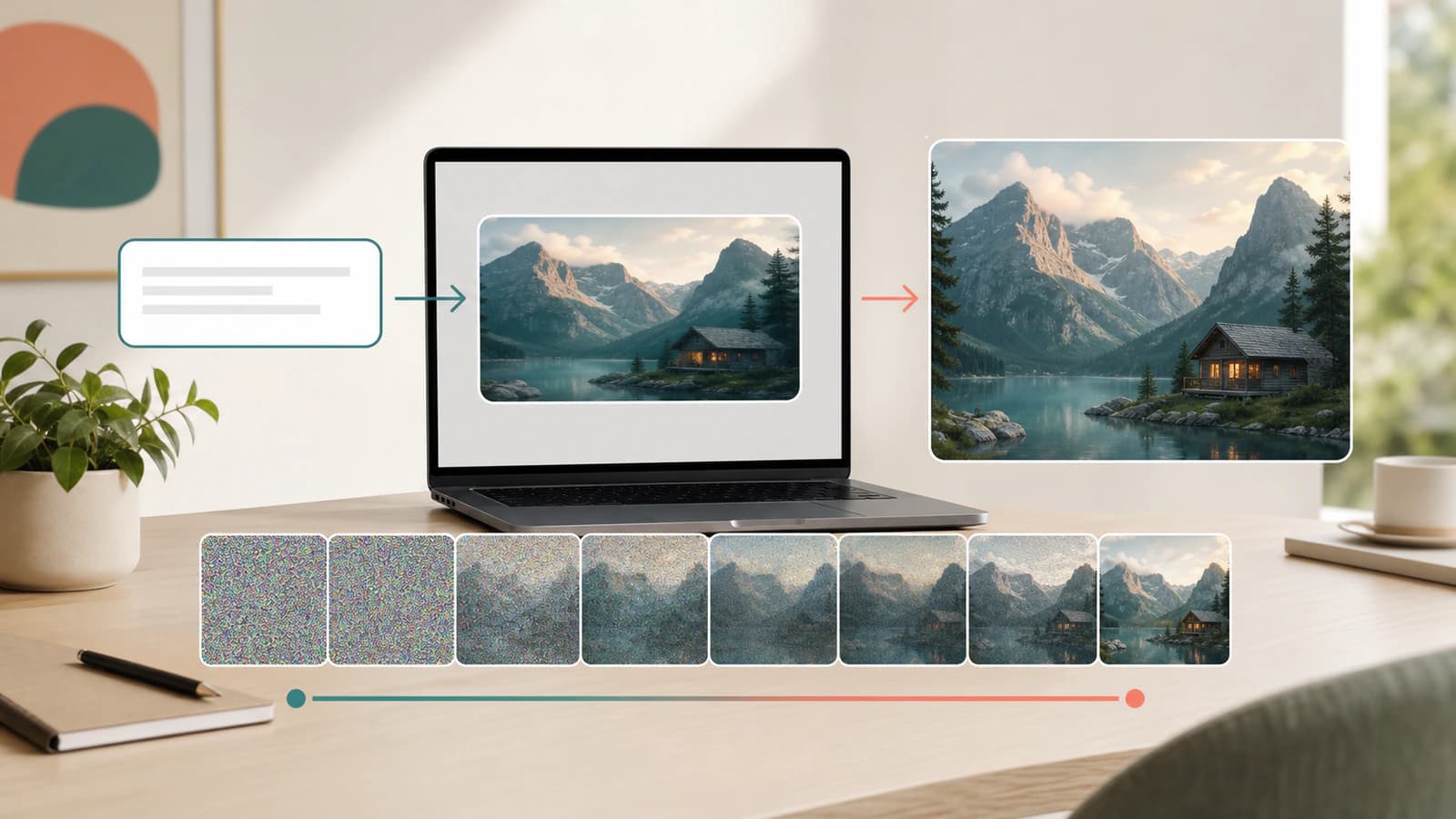
Diffusion is one of the main ideas behind modern image generation. The beginner version is simple: during training, the model learns how images look as noise is gradually added. During generation, it learns to run a related process in reverse, turning noise into an image.
Imagine starting with a television screen full of static. At first, there is no subject. Then faint shapes appear. Those shapes become a scene. Edges sharpen. Textures settle. Colours and lighting become more coherent. After many small refinement steps, the image looks intentional.
In a text-to-image system, the prompt guides those denoising steps. The model is not just trying to make any image. It is trying to make an image that matches the prompt.
Many systems use latent diffusion. Instead of doing all of this directly in full-resolution pixel space, the model works in a compressed representation of the image. You can think of it as working on a compact sketch of the visual structure, then decoding that representation into pixels. This can make high-resolution generation more practical.
This is also why two images from the same prompt can differ. Randomness is part of the sampling process, and small changes early in generation can lead to different compositions, faces, textures or lighting.
How AI Image Editing Works
AI image editing uses the same basic idea, but it starts with more information than a blank generation. You may provide an existing image, then ask the model to change part of it.
Common editing modes include:
- Inpainting: Replacing or regenerating a selected area, such as changing the background behind a product or removing an unwanted object.
- Outpainting: Extending an image beyond its original edges, such as widening a portrait into a landscape banner.
- Image-to-image generation: Using an existing image as the starting point, then changing the style, setting or level of detail.
- Variations: Producing new versions that keep the broad subject or style while changing non-essential details.
- Reference-guided generation: Supplying one or more images to guide style, character, layout, product shape or visual mood.
- Local edits: Asking for a specific change, such as "make the sofa green" or "replace the sky with a clear sunset".
Good editing instructions are specific about what should change and what should stay the same. "Make it better" gives the model too much freedom. "Change only the wall colour to pale blue and keep the furniture, lighting and camera angle unchanged" gives it a much clearer job.
Even then, edits can drift. A model may alter details you wanted to preserve, especially around faces, hands, text, product labels or precise geometry. Serious image work still needs review.
Practical Uses for AI Image Generators
AI image generators are most useful when speed, variation and visual exploration matter.
Practical uses include:
- Brainstorming visual directions before commissioning final design work.
- Creating concept art for characters, environments, products, interiors or campaigns.
- Mocking up ads, social posts, blog hero images, thumbnails and presentation visuals.
- Exploring packaging, merchandise or product styling before a photo shoot.
- Making educational visuals that explain a process, metaphor or abstract concept.
- Producing mood boards for brand, film, architecture or event planning.
- Editing existing images by removing distractions, extending backgrounds or testing colour changes.
- Generating placeholder visuals while a project is still being shaped.
The strongest use case is often not "replace the designer" or "replace the photographer". It is faster exploration. You can see ten directions before deciding which one deserves real craft.
Benefits and Limitations of AI Image Generators
AI image generators are powerful, but they are not reliable cameras, legal advisers or brand guardians. Treat them as creative tools with real constraints.
| Area | Benefit | Limitation | What to watch |
|---|---|---|---|
| Speed | Creates visual options quickly | Fast does not mean finished | Review before publishing |
| Variety | Generates many styles | Results can be inconsistent | Save strong prompts and settings |
| Prompt control | Natural language is easy to start with | The model may ignore or misread details | Use clearer visual instructions |
| Detail | Can create rich texture and atmosphere | Hands, faces, text and geometry can fail | Inspect details closely |
| Editing | Can change parts of an image quickly | Edits may alter nearby areas | State what must remain unchanged |
| Accuracy | Useful for illustrative concepts | Can invent unrealistic or false details | Do not use as factual evidence |
| Bias | Can broaden visual exploration | Data can reflect stereotypes | Review people, roles and cultures carefully |
| Rights and privacy | Can reduce stock dependence | Outputs, references and prompts may raise rights concerns | Avoid private or restricted material |
The short version: AI image generation is excellent for ideas, drafts and controlled creative exploration. It is weaker when the image must be factually exact, legally clear, physically accurate or perfectly consistent across many outputs.
AI Image Generators vs Search, Stock Photos and Photo Editors
It helps to separate image generation from neighbouring tools.
| Tool | Best for | Key difference |
|---|---|---|
| AI image generator | Creating a new image from a prompt or reference | Produces a synthetic image rather than finding an existing one |
| Image search | Finding existing images on the web | Retrieves images that already exist |
| Stock photo library | Licensing ready-made photos or illustrations | Gives clearer usage terms but less custom control |
| Photo editor | Adjusting or compositing existing images | Edits known pixels rather than inventing a whole scene from language |
| 3D or design software | Precise control over assets, layout and geometry | More manual, but better for exact production requirements |
In real workflows, these tools often work together. You might use an image generator for concepts, a photo editor for finishing, and a designer or photographer for final brand-critical production.
How to Use Text-to-Image AI Well
Start with the job the image needs to do. A good blog hero, product mockup, children story illustration and technical diagram need different prompts.
Use this simple prompt pattern:
Create [type of image] showing [subject] in [setting].

Use [style or medium], [composition], and [lighting].

Include [important details].

Avoid [unwanted details].

The image is for [use case or audience].
For example:
Create a clean editorial hero image showing a beginner-friendly AI image generator workflow. Use a bright workspace scene, abstract prompt blocks flowing into an image preview, soft natural light and a premium technology publication style. Avoid logos, readable tiny text, dark sci-fi styling and clutter. The image is for a beginner explainer article.After the first result, refine one thing at a time. Ask for a wider crop, simpler background, more natural lighting, fewer objects, a clearer subject or a different style. If you change everything at once, it becomes harder to learn what improved the image.
For editing, name both the change and the protected parts: "Replace the background with a soft studio backdrop. Keep the person, pose, clothing, lighting direction and facial expression unchanged."
Common Misconceptions About AI Image Generators
The first misconception is that the model simply copies an image from its training data. In normal use, the system generates a new image from learned patterns. That does not remove every rights or memorisation concern, but generation is not the same thing as image search.
The second misconception is that better prompts always need more words. They need more useful visual information. A short precise prompt often beats a long prompt full of vague adjectives.
The third misconception is that AI images are automatically accurate. They are not. A generated picture can look convincing while showing impossible anatomy, fake historical details, incorrect product features or misleading scientific visuals.
The fourth misconception is that editing is perfectly local. In practice, asking for one change can affect nearby details or the overall style. Always compare the edited image with the original if preservation matters.
The fifth misconception is that one good image means the system understands the world like a person. It may have learned strong visual patterns, but it can still miss context, physics, culture, intent and factual nuance.
What to Remember About AI Image Generators
- AI image generators create new images from prompts, references or editing instructions.
- A prompt is best treated as a visual brief: subject, setting, style, composition, lighting and constraints.
- Many modern systems use diffusion-style generation, which refines noise into an image through many small steps.
- Latent diffusion often works in a compressed visual representation before decoding the result into pixels.
- Editing tools can inpaint, outpaint, create variations and make prompt-guided changes to existing images.
- AI-generated images are useful for ideation and drafts, but they still need human review for accuracy, bias, rights, privacy and brand fit.
FAQ About AI Image Generators
How do AI image generators turn text into images?
They convert your text prompt into a machine-readable representation, then use that representation to guide an image model. In diffusion-style systems, the model starts from noise and repeatedly refines it until the result matches the prompt.
What are AI image prompts?
AI image prompts are instructions you give an image generator. They can include the subject, setting, visual style, composition, lighting, colours, mood, camera angle, constraints and anything that should be avoided or preserved.
What does diffusion mean in AI image generation?
Diffusion is a generation method where a model learns to reverse a noising process. For beginners, think of it as starting with random static and gradually cleaning it into an image that matches the prompt.
Are AI image generators copying existing pictures?
They usually generate new images from patterns learned during training rather than retrieving a specific existing image. However, training data, memorisation, style imitation and rights questions still matter, especially for public, commercial or sensitive work.
Why do AI image generators struggle with hands and text?
Hands, readable text and exact geometry require fine detail, consistency and symbolic precision. Image models are improving, but they can still produce plausible-looking details that fall apart when you inspect them closely.
Can AI image generators edit real photos?
Yes, many tools can edit images by changing selected areas, extending a scene, creating variations or applying a new style. The result should be checked carefully because the model may alter details outside the requested change.
What are AI image generators best used for?
They are strongest for visual brainstorming, concept art, marketing mockups, mood boards, educational illustrations, early product ideas and quick image edits. They are weaker when you need factual proof, exact product accuracy, legal certainty or perfect consistency.
About the author
Hi, I'm Jason Futrill.
I'm an tech professional and commentator exploring how intelligent systems are reshaping work, creativity, and society.
More about me